Showing posts with label Refill Instructions. Show all posts

18 December 2016

Ink Refilling Instructions Canon PG-545 BK Cartridge Refill Kit

"Refill instructions for refilling the Canon PG545 black ink cartridge used in the Canon Pixma MG2450, MG2550, MG2550S, MG2950, IP2850, MX495 printers."

Before you begin, cover all valuable surfaces with newspaper and wear protective gloves.  The tools and ink used in this process are from the Eco-Fill Professional Refill Kit for Canon PG-545 CL-546 Ink Cartridges.
Please support our work by buying our products at http://premium-inks.com/

Remove the label on the black PG545 cartridge. You will see 17 compartments.  You need to make a hole inside the rectangular section shown below with the screw tool.  
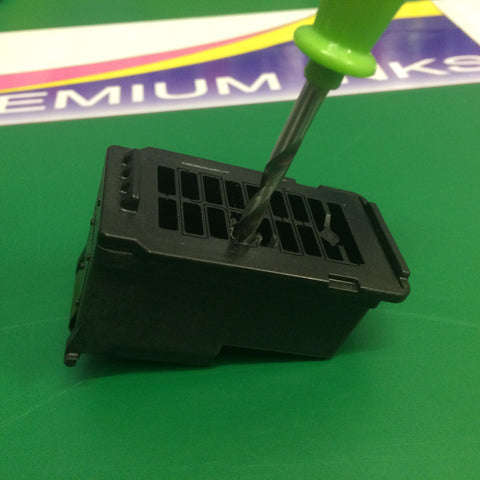
Make hole in the top of the cartridge with the screw tool.
The plastic is tough so you will need to apply downward pressure when you twist the screw tool.
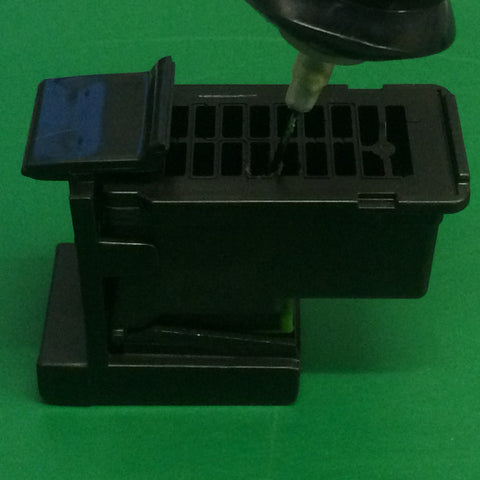
Inkjet black ink into the PG-545BK cartridge.
Now click the PG545 black cartridge into the refill clip.  Push the needle down through the hole and into the sponge.  Very slowly squeeze the ink bottle to inject a small amount of ink into the sponge.  Now withdraw the needle, then push it back into the sponge at a different angle, then inject another small amount of ink into the black cartridge.  Repeat this exercise until you are satisfied that the cartridge is full.  Avoid overfilling the cartridge as this can cause ink to leak out of the print head nozzle, and spill out of the top of the cartridge. As a guide the standard capacity cartridge holds 10ml and the Xl 18ml.  However, we recommend you only inject 7ml or 12mm.
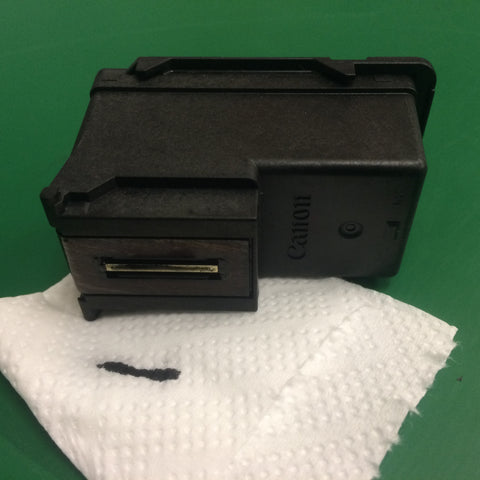
 Dab the print head on a tissue to se if you get a black line.
Remove the cartridge from the refill clip and wipe the print head nozzles with a paper towel.  Now dab the print head on the paper towel.  If you are not getting a consistent black line when you dab the print head on a tissue, you will need to use the ink suction tool to prime the cartridge.
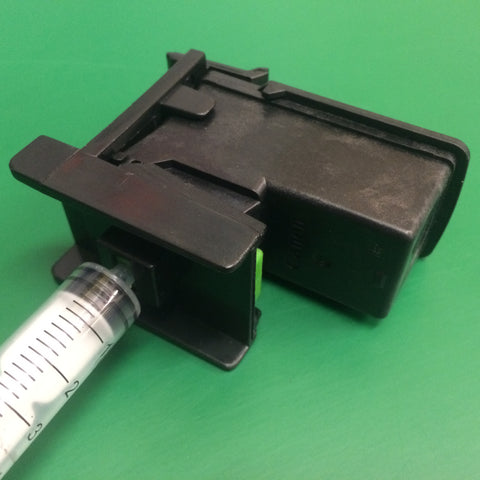
Click PG545 black cartridge into the refill clip and fit syringe.  Pull back on the lever to prime the cartridge.
Click the black PG545 cartridge back into the refill clip and attach the syringe.  Now slowly pull back 20mm on the lever until you see ink and air bubbles.  Remove the cartridge from the clip and wipe the print head.  Now test for black line on paper towel.  
Re-install the cartridge into the printer.  The printer will display a warning, "ink cartridge is empty".  Press the Stop/Reset button for 5 seconds.  This will disable the ink monitor / ink level indicator on the printer and allow you to continue printing.

The refilling parts and ink shown in this guide are from our Eco-Fill Professional Refill Kit for Canon PG-545 CL-546 Ink Cartridges.
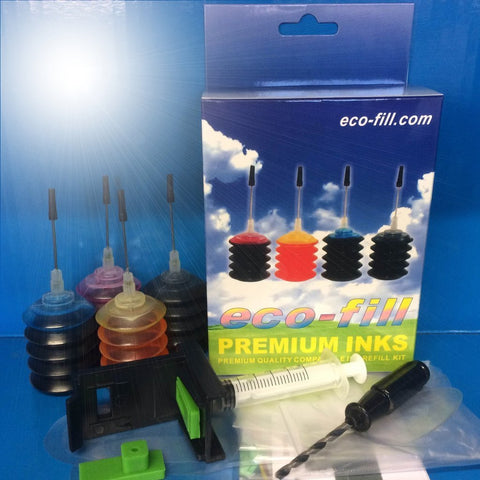
Ecofill PG545 Refill Kit

These refilling instructions are for guidance only.  We take no responsibility for any loss incurred.
All brand names and trademarks are the property of their owners and are used for descriptive purposes only.  The above products are Non-OEM.  Not made by Canon. 

26 November 2016

Refill Instructions for Canon PGI-570 BK CLI-571 BK/C/M/Y TS5050 TS6050 Ink Cartridges

PGI-570 BK and CLI-571 BK/C/M/Y are the latest series of ink cartridges for use with Canon Pixma MG5750, MG5751, MG5752, MG5753, MG6850, MG6851, MG6852, MG6853, MG7750, MG7751, MG7752, MG7753 printers. Most of the printers use 5 cartridges, however some also employ a CLI-571 GY Grey/Gray.

The usual method of refilling this design of Canon cartridge has been to drill a hole in the top and inject ink inside the plastic container.  Recent developments in the design of inkjet cartridges have seen the internal capacity of ink considerably reduced.  The CLI-571 BK/C/M/Y/GY cartridges now only hold 7ml of ink, with 4ml in the sponge. A large section of these cartridges are blanked off and left empty.  So there is now no real need to drill a hole in the casing as it is perfectly possible to refill the sponge directly from underneath.

1.  Remove the label from the top of the cartridge(s) to open the vacuum.
2.  Put some newspaper or paper towel on a work surface away from any valuable items.  Place the cartridge(s) upside down so that you can see the ink outlet sponge area.
3.  Using a syringe with the correct colour ink inside, carefully allow some drops of ink to fall onto the exposed sponge area of the cartridge.  Remember that the sponge can only hold 3ml to 4ml, so allow 2ml of ink to drop initially, then wait for this to be absorbed before later adding another 1ml to 2ml of ink.
4.  Leave cartridge to stand upside down for a while to avoid spillages.
5.  Replace the cartridge(s) into the printer.
6.  The following message will appear on the printer LCD screen "The ink has run out, replace the ink tank".  Then "STOP" will appear with a triangle and circle below.   Press and hold the triangle circle until the "STOP" and triangle circle light go out. This will turn off that particular colour chip sensor!  You may have to repeat this process for it to be successful, and every time you take the cartridge out and replace it.

The Eco-Fill ink refill kit for PGI-570 BK Black and CLI-571 BK/C/M/Y Colour cartridges which contains 6 bottles of ink and the above refilling instructions is available from the Premium Inks shop.

https://premium-inks.com/collections/eco-fill-professional-refill-kits-for-canon-and-hp-printers/products/canon-pgi-570bk-cli-571-bk-c-m-y-refill-kit-6-x-28ml-ink-instructions
* These instructions are for guidance only. We take no responsibility for any losses incurred.

25 November 2016

Refill Instructions for Canon Pixma MG5450 MG5550 MG5650 iP7250 Cartridges

Refilling original OEM printer ink cartridges can be a messy business.  Manufacturers did not design their cartridges to be refilled; they prefer you buy a new one each time.  Of course, this does nothing to protect the environment, so refilling and reusing cartridges makes sense.

The Canon Pixma MG5400, MG5450, MG5550, MG5650, MG6300, MG6350, iP7250, MX725, and MX925 printers use the PGI-550 BK and CLI-551 series cartridges.  These cartridges are containers of ink with a smart chip that click into a print head that is built into the printer.  Refilling them involves drilling holes in the top of the cartridges and injecting ink into them.  

Modern day cartridges hold far less ink than traditional ink cartridges.  For example, the PGI-550 and CLI-551 only hold 3ml to 4ml of refilling ink.  Much of the internal cartridges is blanked off; making an unused empty space.  Therefore with the lower capacity, more frequent refilling is needed. In contrast, purpose made refillable reusable cartridges for Canon PGI-550 BK and CLI-551 BK/C/M/Y 
Refillable cartridges Canon Pima mg5550 mg5650 ip7250 printers
hold approximately 15ml to 10ml per refill.  They also benefit from a dedicated refill hole with a rubber plug, and automatically resetting microchips, making the refill process far easier and more successful.  Because of this, we discourage customers from refilling original Canon 550/551 cartridges.  However, if you are determined to try this then please see our comprehensive instructions in our news blog...

Refill instructions for Canon PGI-550 BK CLI-551 BK/C/M/Y Ink Cartridges


23 November 2016

HP 304 Refilling Instructions - How to refill HP304 printer ink cartridges

The new HP Deskjet 2620, 2632, 3270, 3370, 3720, 3722, 3723, 3730, 3732, 3733, 3752, 3755, HP Envy 5020, 5030, 5032 printers using the new HP304 series ink cartridges.  Maybe the reason you are reading this article is because replacement cartridges are expensive.  This is because the HP 304 cartridges have built-in print heads which contribute greatly to the price of replacement cartridges.  On the upside, you get a new print head each time, but we feel this is unnecessary as they have multiple life cycles.  So refilling them makes both financial and environmental sense.

Sadly refilling is not for everyone.  Modern day life can be busy and stressful; spare time limited.  So if you are thinking of buying one of the above printers, then stop and think!  Do you have the time and patience to perform regular cartridge refilling procedures? If you already own one of these printers then refilling is the only sane option, so read on for more details...

Equipment required... Bottles of Black, Cyan, Magenta, and Yellow ink.  4 syringes (if needles not already fitted to bottles), a screw tool, paper towel, and gloves.  Buy a refill kit containing all of the tools and ink from Premium Inks!

There is a label on the top of each cartridge which covers up where you need to make the refilling holes.  You will need to make one hole to refill the black cartridges (see diagram) and three holes in the top of the colour cartridge.  
hp304 black cartridge

The colour cartridge has three separate ink compartments for the cyan, magenta and yellow colours.  See diagram.  Use a screw tool to make the holes in the appropriate places.  Then push the filling needle into the hole and into the inner sponge.  Then VERY VERY SLOWLY inject a very small amount of ink into the cartridge.  I say 'a very small amount of ink' because these HP304 cartridges have a very low capacity, however, the HP304xl versions are more generous.  If you see bubbles start to appear at the top of the needle, then stop.  Bear in mind that the sponge has to absorb the ink and this is not always instant, so take your time.  Give the sponge a fighting chance to absorb the ink, otherwise due to pressure, it might flow straight out of the bottom of the cartridge print head.  Repeat this exercise for all the colours that need refilling. Dab the print head on a paper towel and gently wipe off excessive ink.  Then dab the print head on the paper towel again to check for lines of black and colour.  The black cartridge should produce a solid black strip, and the colour cartridge three strips, a cyan, a magenta and a yellow.  If one of the colours is not coming through, then leave the cartridge overnight which will give time for the ink to soak into the sponge.  Do not leave on a kitchen towel as this will draw ink out of the cartridge! Finally, put the cartridge into the printer and perform a test print.  You may get an error message saying that the cartridge is low or empty.  You can bypass these error codes by pressing various buttons on the printer or connected computer.

Useful Tips

When refilling be careful not to contaminate the different colours by getting excessive ink on the top or bottom of the cartridges.  You do not want the wrong ink to flow into the wrong holes or through the wrong nozzle.

The best piece of advice I can give you is to take your time.  Rushing is a really bad idea and usually, results in spilt ink and messy hands.  Make sure you cover all work surfaces before you begin!

Troubleshooting Guide

One or more of the colours are not printing?
Leave the cartridge overnight giving ample time for the ink to soak into the sponge.  (Do not leave on a kitchen towel as this will draw ink out of the cartridge!)

I have left the cartridge overnight but it is still not printing correctly?
Use a suction tool to draw ink through and out of the print head nozzle.  The Eco-Fill Professional Refill Kit comes complete with a suction tool.
refill kit, hp304, hp 304, ink, suction tool, screw tool, instructions


The yellow ink coming out of the cartridge looks green?
The yellow colour compartment has been contaminated with cyan ink.  Hopefully, with future printing and refilling, the problem will correct itself.

22 November 2016

Refilling Instructions for Epson Daisy 18 xl Series Ink Cartridges Refill T1811-4

Refill Instructions for Epson Daisy 18 xl Series Ink Cartridges (T1811 Black, T1812 Cyan, T1813 Magenta, T1814 Yellow).  For use with Epson Expression Home XP30, XP102, XP202, XP205, XP212, XP215, XP-225, XP302, XP305, XP312, XP315, XP322, XP325, XP402, XP405, XP405WH, XP412, XP415, XP422, XP425 printers.

It is possible to make a hole in the top of the four cartridges and inject ink into them, albeit rather a messy process with the original Epson cartridges.  Unfortunately after doing this the printer will not allow them to be reused or recycled because they contain a smart chip that estimates and tells the printer how much ink is left in the cartridge(s).  Once they reach empty status the printer will not accept them and will refuse to print.  The only way to get them recognized by the printer is to zap the microchips with a chip resetter, which will hopefully reset the ink monitor levels back to full again!  These cost between £15 to £20.
What problems associated with refilling Epson Daisy OEM Ink Cartridges?
1. When the microchips read empty the printer will refuse to accept them.  You will need to buy a chip resetter to reset printer monitor ink levels.
2. Making a hole in the top of the cartridges is messy and fragments of plastic can contaminate the ink and could later block the print heads.
3. Original Epson Daisy cartridges are not designed to be refilled and do not accept refill ink  as well as special refillable cartridges with auto reset chips.
4.  OEM Daisy cartridges can only be refilled so many times before they will need to be replaced.  They will soon begin to leak from the bottom outlet valve.

What are the alternatives to refilling original Epson Daisy cartridges?
1. Buy special empty reusable refillable ink cartridges to replace Daisy 18/18xl cartridges. These dedicated refillable cartridges are very easy to refill.  They have a rubber plug in the top that you remove, before injecting the ink into the clear chamber, then you replace the plug. They have ARC (auto reset chips) fitted that work on an artificial cycle which estimates ink use similar to original Epson Daisy cartridges.  When the monitor reads empty, they auto reset back to read full again.
https://premium-inks.com/collections/refillable-cartridges/products/set-refillable-refill-ink-cartridges-epson-expression-home-xp322-xp422-non-oem
2. Buy a CISS System.  The problem with CISS systems is that tubes are connected to the cartridges going to an external ink tank.  Because the ink cartridge carriage moves right to left, left to right, so does the connected tubes.   These tubes have to be tied down in a precise manner to avoid major problems.  There is also the problem with the scanner lid that cannot be closed unless you modify the case.  The ink bottles have to be at the same level as the printer, otherwise gravity will push the ink through the cartridges and flood the printer.  Finally, CISS systems are prone to damage in the post.  The ink tanks can split easily or pipes can come loose flooding the package with ink.

In summary we have looked at all methods of replenishing the ink supply in Epson printers that use Daisy series ink cartridges.  The stand out option for us is Buy special empty reusable refillable ink cartridges to replace Daisy 18/18xl cartridges.

What type of ink do we use to refill my Epson Daisy cartridges?
Three types of ink can be used to refill Daisy 18 Series cartridges.  The most common type is Dye refill ink for Daisy cartridges, which is the cheapest type to buy.  For everyday printing this is the best choice.  Premium quality dye ink offers a solid and reliable performance.  The disadvantages are that it fades in the Sun and is not water-proof.
Pigment ink for Daisy cartridges is more expensive than Dye ink but is fade resistant and water proof to a degree, however still not recommended for outdoor use.
Sublimation ink for Daisy cartridges is designed for heat transfer.  You print your design on to paper, then heat it onto the object.  The gas in the ink transfers the design to the coated object.