24 December 2016

Refill Ink Epson EcoTank ET-2550 ET-2500 High Quality Dye

The new cartridge free Epson EcoTank ET-2550 and ET-2500 printers are very popular, and we are pleased to offer premium quality dye refill ink for use in them.
https://premium-inks.com/collections/epson-dye-printer-refill-ink/products/400ml-refill-ink-epson-ecotank-et-2500-et-2550-printers-non-oem
PREMIUM QUALITY DYE REFILL INK BOTTLES FOR REFILLING EPSON ECOTANK ET-2550 ET-2500 PRINTERS.

4 x 100ml (Black, Cyan, Magenta, Yellow)
200ml x Black,
400ml x Black,
200ml x Cyan,
200ml x Magenta,
200ml x Yellow.

All brand names and trademarks are the property of their owners and are used for descriptive purposes only.  The above products are Non-OEM (Not made by Epson).

18 December 2016

Ink Refilling Instructions Canon PG-545 BK Cartridge Refill Kit

"Refill instructions for refilling the Canon PG545 black ink cartridge used in the Canon Pixma MG2450, MG2550, MG2550S, MG2950, IP2850, MX495 printers."

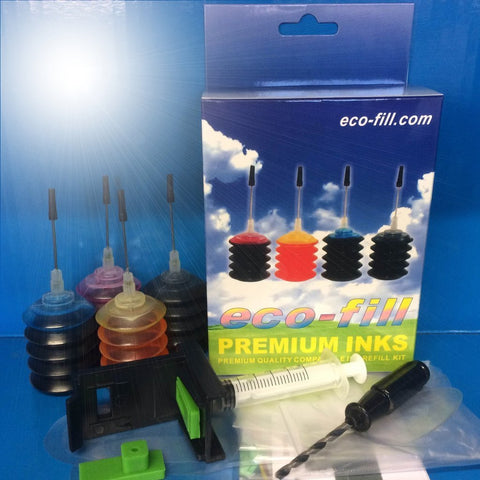
Before you begin, cover all valuable surfaces with newspaper and wear protective gloves.  The tools and ink used in this process are from the Eco-Fill Professional Refill Kit for Canon PG-545 CL-546 Ink Cartridges.
Please support our work by buying our products at http://premium-inks.com/

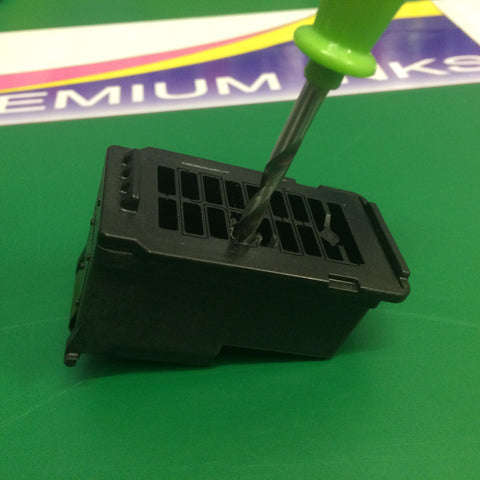
Remove the label on the black PG545 cartridge. You will see 17 compartments.  You need to make a hole inside the rectangular section shown below with the screw tool.  
Make hole in the top of the cartridge with the screw tool.
The plastic is tough so you will need to apply downward pressure when you twist the screw tool.

Inkjet black ink into the PG-545BK cartridge.
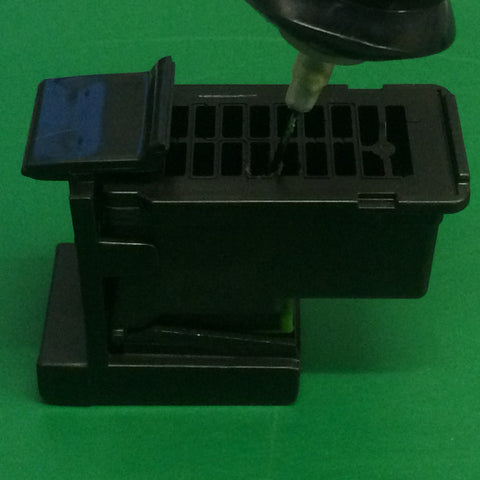
Now click the PG545 black cartridge into the refill clip.  Push the needle down through the hole and into the sponge.  Very slowly squeeze the ink bottle to inject a small amount of ink into the sponge.  Now withdraw the needle, then push it back into the sponge at a different angle, then inject another small amount of ink into the black cartridge.  Repeat this exercise until you are satisfied that the cartridge is full.  Avoid overfilling the cartridge as this can cause ink to leak out of the print head nozzle, and spill out of the top of the cartridge. As a guide the standard capacity cartridge holds 10ml and the Xl 18ml.  However, we recommend you only inject 7ml or 12mm.

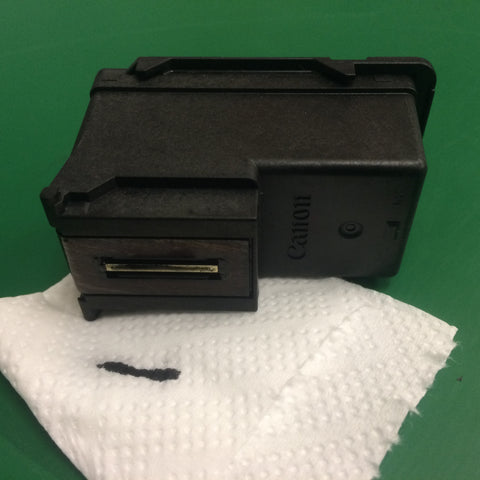
 Dab the print head on a tissue to se if you get a black line.
Remove the cartridge from the refill clip and wipe the print head nozzles with a paper towel.  Now dab the print head on the paper towel.  If you are not getting a consistent black line when you dab the print head on a tissue, you will need to use the ink suction tool to prime the cartridge.
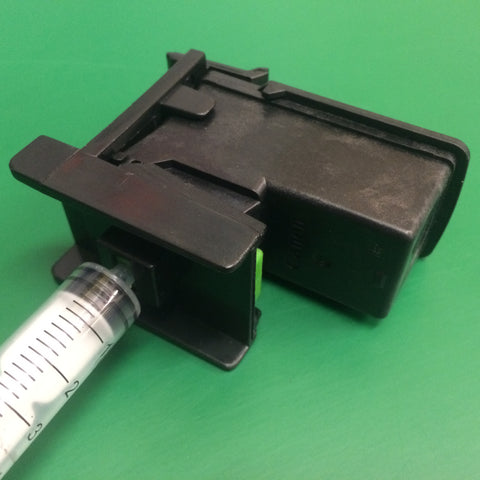
Click PG545 black cartridge into the refill clip and fit syringe.  Pull back on the lever to prime the cartridge.
Click the black PG545 cartridge back into the refill clip and attach the syringe.  Now slowly pull back 20mm on the lever until you see ink and air bubbles.  Remove the cartridge from the clip and wipe the print head.  Now test for black line on paper towel.  
Re-install the cartridge into the printer.  The printer will display a warning, "ink cartridge is empty".  Press the Stop/Reset button for 5 seconds.  This will disable the ink monitor / ink level indicator on the printer and allow you to continue printing.

The refilling parts and ink shown in this guide are from our Eco-Fill Professional Refill Kit for Canon PG-545 CL-546 Ink Cartridges.
Ecofill PG545 Refill Kit

These refilling instructions are for guidance only.  We take no responsibility for any loss incurred.
All brand names and trademarks are the property of their owners and are used for descriptive purposes only.  The above products are Non-OEM.  Not made by Canon. 

15 December 2016

Refilling HP 301 Ink Cartridge with Refill Kit by Eco-Fill

"Description: Article describing how to refill the HP 301 / HP301 xl printer ink cartridges.  What are the best refilling procedures to use?  What is the best refill kit for HP301?"

The HP 301 cartridges, labelled 'intended for single use only', contain a fixed print head. Much of the technology is built-into the print head on the cartridge.  So we think that is makes strong economic and environmental sense to recycle and refill these cartridges as many times as possible.

Eco-Fill offer a dedicated ink refill kit for refilling the HP301 standard and HP301 xl ink cartridges. These kits come with enough ink to refill your HP 301 cartridge numerous times.  The four ink bottles have a built-on needles, so no need to transfer the ink to a syringe. The refilling tools include a cartridge clip suction tool, and screw tool.

https://premium-inks.com/collections/ecofill-hp-professional-refill-kits/products/ecofill-hp-301-professional-refill-kit-black-colour

All brand names and trademarks are the property of their owners and are used for descriptive purposes only.   The above are Non-OEM (Not made by HP).
 

11 December 2016

Brother LC-223 / LC223 xl Compatible Ink Cartridges MFC J4625DW J5625DW etc.

Replacement ink cartridges for Brother LC-223 printers.

Replacement generic compatible ink cartridges for Brother DCP-J4120DW, DCP-J562DW, MFC-J4420DW, MFC-J4620DW, MFC-J4625DW, MFC-J5320DW, MFC-J5620DW, MFC-J5625DW, MFC-J480DW, MFC-J680DW, MFC-J880DW printers are now available!

To replace LC-223BK BLACK INK CARTRIDGE, LC-223C CYAN INK CARTRIDGE, LC-223M MAGENTA INK CARTRIDGE, LC-223Y YELLOW INK CARTRIDGE. 

GO TO SHOP


All brand names and trademarks are the property of their owners and used for descriptive purposes only. These products are Non-OEM (Not made by Brother).

08 December 2016

Refill Instructions for Refilling HP Deskjet 1110 2130 2132 2134 3630 3632 3634 3636 3638 Printers

New refill instructions have been published and can be found at Premium Inks for refilling HP 302 standard and HP302 xl ink cartridges. If you own a Hewlett Packard Deskjet 1110, 2130, 2132, 2134, 3630, 3632, 3634, 3636, 3638, HP Envy 4520, 4522, 4523, 4524, 4527, or HP Officejet 3830, 4650 printer, then this information could save you a lot of money!  Particularly following the significant price rises after Brexit.
 HP 302 Ink Cartridge Refill KitTo complete a successful refill of the black and colour HP302 ink cartridges, you will need printer ink and refill tools. These are available from the Premium Inks website with free next day delivery in the UK. Delivery charges apply to Europe and the rest of the World.
All brand names and trademarks are the property of their owners and are used for descriptive purposes only.  The above product is Non-OEM (Not made by HP)


05 December 2016

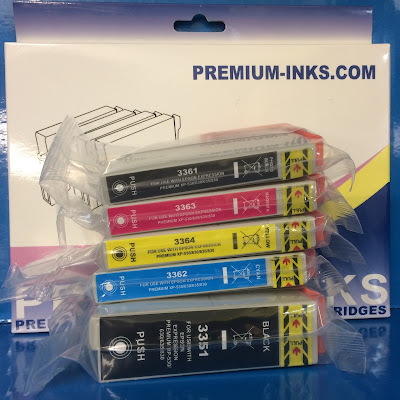
33xl Compatible Cartridges Epson Expression Premium XP 530 540 630 635 640 645 830 900 Printers

https://premium-inks.com/collections/epson-compatible-ink-cartridges/products/33xl-ink-cartridges-xp530-xp630-xp635-xp830-replace-t3351-t3364-non-oem
Compatible generic ink cartridges to replace Epson 33 / 33xl and for use with Expression Premium XP530, XP540, XP630, XP635, XP640, XP645, XP830, XP900 printers.

These cartridges are filled with high quality dye ink.  They contain microchips with the latest software so that they are recognized by the above printer models.


 All brand names and trade marks are the property of their owners and used for descriptive purposes only.  These products are Non-OEM (Not made by Epson).

04 December 2016

Best Printer to Refill - Part 1 (Cheap printer to refill / Cheapest printer for cartridges)

The most important elements making up the best printer for refilling are…

* Easy to refill.
* Cheap to refill.
* Good print quality.
* Medium to heavy duty construction.
* Convenient connection options.
* Initial printer purchase price.

Finding a printer that ticks all of the above boxes is almost impossible! Printer manufacturers don’t want printers to hang around too long anymore. Gone are the days that you could buy an Epson Stylus Photo R200 / R220 / R300 / R320 printer; plug in a CISS, and use it for the next ten years!
ciss printer

Modern day machines contain more plastic. Many of the heavy metal components have been replaced with, by design, mass produced parts with a very limited lifespan. Computer programs calculate the parameters for fine tuning the longevity of use and the inbuilt obsolescence of the hardware. The death certificate has already been written before the printer is born.

The last fifteen years have seen major changes in ink cartridge technology. Standard use domestic cartridges commonly contained 50ml of ink. Modern day cartridge capacities have been dramatically reduced, in some cases down to just 3ml, increasing the cost per print price. However, this does not take into account the counter balance argument being, the initial purchase price of printers is lower than that of fifteen years ago. Added to the equation, the technology included and the available features provided for under £150 are totally impressive. Printers can now communicate with smartphones and tablets, and it is now possible to print from any internet connected location in the world.

Ten years ago, print head and ink technology gathered a pace. Print resolutions improved, so did how the ink interacted with non-coated paper. Ink began to stand prouder on the surface, not soaking so much into the fibres of the paper. There were also advances in print speeds on some models, however, many remain painfully slow.

Manufacturers have discouraged printer owner from refilling their cartridges. One of the first to do this was Lexmark.  They introduced single-use ink cartridges which would not be accepted by the printer after being refilled.  Epson introduced the 'intellichip', which we were told was to provide the printer with intelligent ink level information. The downside being, once the monitor level read empty, the printer would no longer accept the cartridge.  Later Canon began to use microchips on their ink cartridges, and it was necessary to disable the ink monitor after refilling. Until three years ago Brother were the only manufacturer not to use smart chips on their cartridges. Sadly, this changed with the introduction of the LC123/LC125/LC127 series cartridges. Third party microchip manufacturers were slow to emulate the new Brother chips, and when they did, Brother used WiFi automatic firmware printer updates to change the codes, rendering compatible and refillable cartridges useless until the new version chips became available.

Over recent years Epson has employed firmware updates on many of their printers. They have also introduced new versions of popular cartridges like the T0801–6 series, meaning particular printer models would not work with older chips.

Click for Part 2